
How to Manage Properties in Our Landlord Portal
The Properties section of the landlord portal is the central hub for viewing and managing the properties you own or oversee through Padmission Journey. From a single location, you can access detailed property information, review tenancy records, track payments, manage documents, and monitor key operational details.
The Properties section is one of the most powerful tools in the landlord portal, giving property owners and managers the information they need to stay organized, address issues efficiently, and keep HOM-assisted tenancies running smoothly.
In this guide, we'll explore the features available within the Properties section of the landlord portal and show you how to make the most of them.
Viewing Your Properties
When you select Properties from the main navigation menu of the landlord portal, you'll see a list of all properties associated with your organization, based on your permission level.
You can search properties by name or address, filter results to show only properties with assisted tenancies, and sort the list by any available column to quickly locate specific properties.
Selecting a property opens its detailed property record. The Property Information tab provides key property details, including:
- Property name, type, and address
- Property owner
- Management company
- Assigned HOM property specialists
- Payee information and payment method
- Total unit count and occupancy statistics
- Number of active assisted tenancies
This information allows you to verify property details, review management and payment information, and understand the property's current participation in the HOM program.
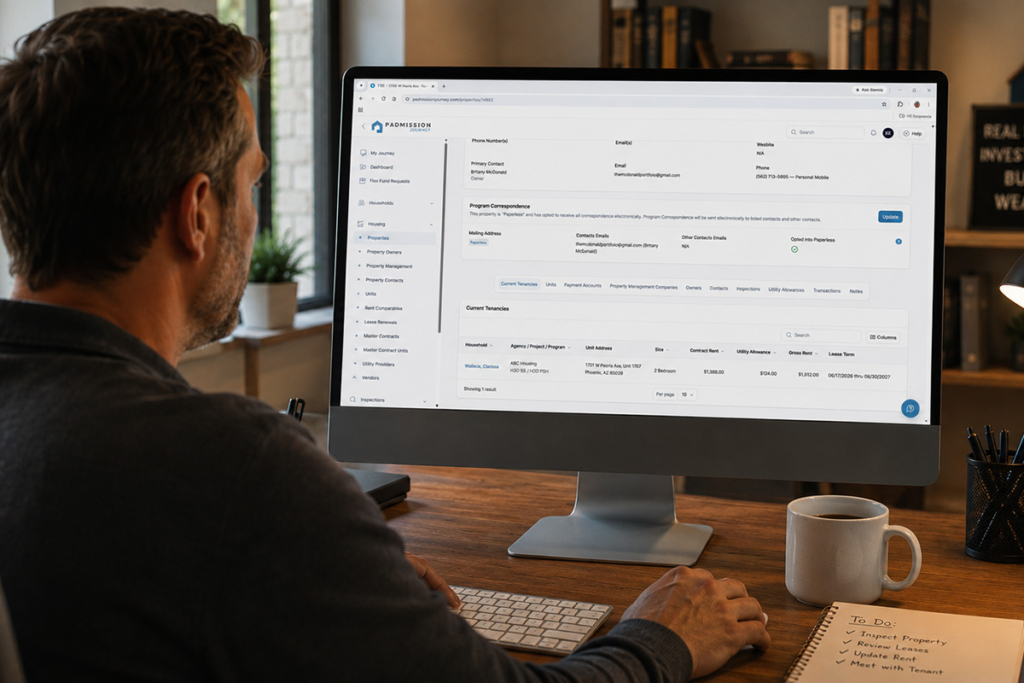
The Properties section serves as the central hub for managing property information, payment history, tenancy records, and documents.
Property Information Tabs
The Units, Transaction History, and Property Contacts sections are located as tabs at the bottom of the Property Information page within the landlord portal.
After selecting a property from the main Properties list and opening its Property Information page, you will see these tabs along the lower portion of the screen. Each tab provides a specific view of operational, financial, and contact-related details for that property.
Units
The Units tab provides information about units that have been built in Padmission.
Available details include:
- Unit number or identifier
- Bedroom and bathroom count
- Square footage
- Occupancy status
- Accessibility features
This information helps property owners and managers better understand overall property utilization and available rental capacity.
Combined with tenancy and occupancy information, the Units tab offers valuable insight into how your property is performing at any given time.
Transaction History
The Transaction History section allows you to review financial activity associated with a specific property.
You can view:
- Payment dates and amounts
- Housing Assistance Payments (HAP)
- Security deposit payments
- Utility reimbursement payments
- Payment status and processing information
- Check numbers or ACH reference codes
This section makes it easier to track assistance-related payments, verify transactions, and monitor the financial activity tied to your property.
Property Contacts
The Property Contacts tab displays the individuals and organizations associated with a property.
While you can view contact information within the portal, only Admin users and HOM staff can add, edit, or remove property contacts.
If you need to update contact information, reach out to the appropriate HOM representative for assistance.
You can also learn more about user access and permissions in our article on managing Contacts within the landlord portal.
Current Tenancies
The Current Tenancies tab at the bottom of the property displays all active HOM-assisted households associated with the property.
To protect participant privacy, personal household information such as full names, Social Security numbers, income details, and family composition are not visible through the portal.
If you need more information about a tenancy for operational reasons, HOM staff may be able to assist while maintaining all applicable privacy requirements.

Landlords can use Padmission to stay connected with property details, transaction history, and important updates on the go.
File Manager
Each property includes a dedicated File Manager where you can manage property-related documentation.
The File Manager is a separate tab located at the top of the Property Information page.
Within the Document Center, you can:
- View uploaded documents
- Check document approval status
- Upload required documents
- Download approved documents
- Monitor document expiration dates
Uploading a document is simple:
- Open the property's Document Center.
- Click Upload Document or select the required document type.
- Choose a PDF or image file (maximum size 100MB).
- Add any notes for HOM staff.
- Submit the document for review.
After submission, documents are reviewed by HOM staff before approval. Status indicators allow you to track whether a document is pending review, approved, rejected, or nearing expiration.
Keeping documents current can help prevent delays and reduce the likelihood of payment interruptions.
Understanding Property Access Limitations
To protect data integrity and maintain compliance, property owners and managers have several important limitations within the portal.
You can view information and upload documents, but you cannot:
- Edit property information
- Add or remove units
- Modify tenancy records
- Change payee or payment information directly
- Access properties you do not own or manage
These restrictions help ensure that property and program data remain accurate and secure.
If information appears incorrect, HOM staff can review the issue and make updates when appropriate.
Video Tutorials
We've put together a series of short tutorial videos to help you navigate different features of the landlord portal. Select a link below to watch a short video walkthrough.
Bringing Everything Together
The Properties section serves as the operational hub for each property in your portfolio. It brings together tenancy information, payment history, contacts, inspections, and document management into a single, organized location.
Log in to Padmission Journey and explore the Properties section today. Spending a few minutes familiarizing yourself with the available information can save time, improve communication, and help keep your properties operating smoothly.
If you have questions about a specific property or need assistance updating property information, contact landlordsupport@hominc.com.